

Using Merge Fields to customize your quotes, proposals and emails can add up to saving a ton of time while creating a highly personalized experience for your customer. Quoter offers a wide range of Merge Fields your business can use to eliminate some of the repetitive parts of quote creation. Using Merge Fields mitigates human error, either from spelling or simply forgetting to update T&C or MSA text from a Proposal Template.
In this post, we cover all of the supported Merge Fields and common parts of a sales process where Merge Fields are used.
Where can Merge Fields be used in Quoter?
Email (Subject Line, Body, Quote PDF Filename / Accepted Filename)
- Sent quotes and proposals
- Order confirmation
- Acceptance confirmation
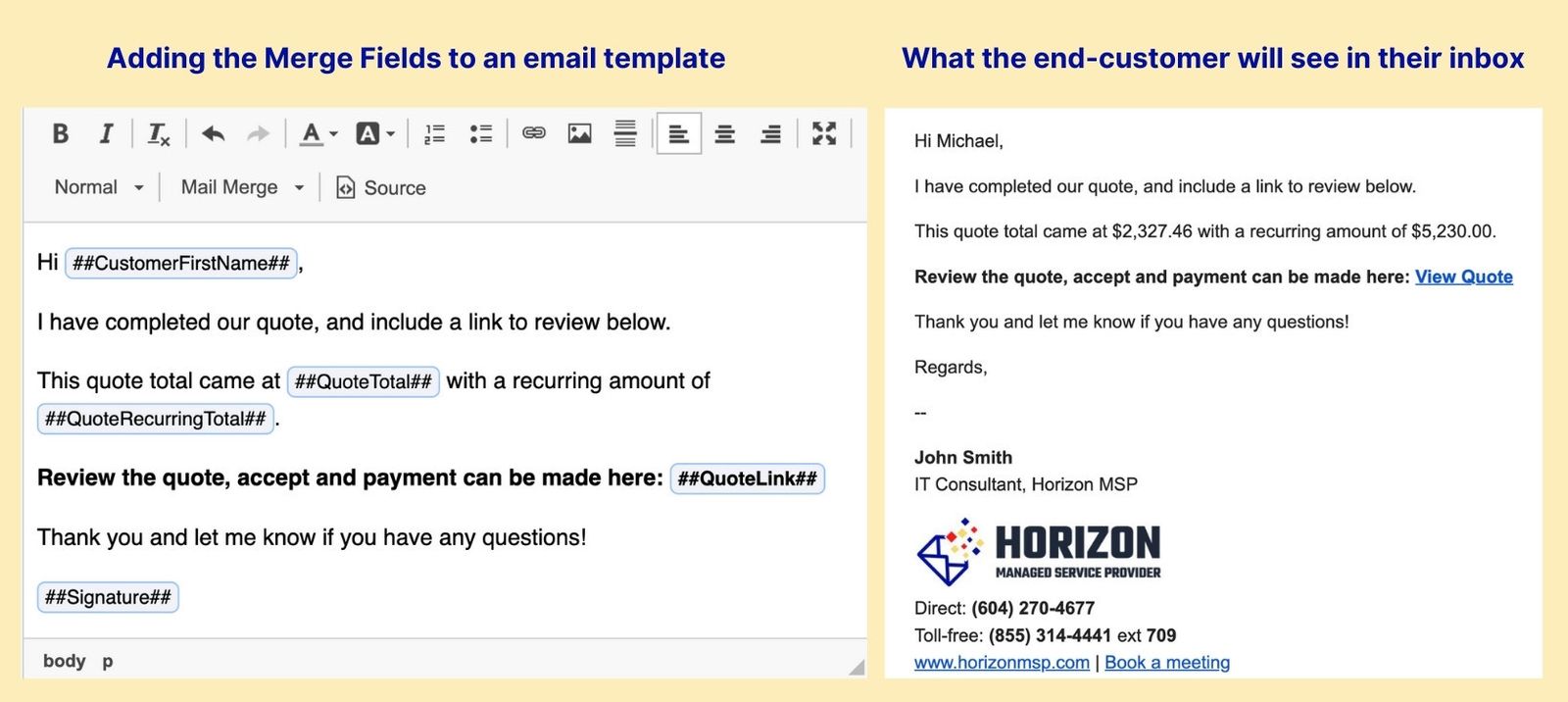
Quote / Proposal Templates
- Cover Page
- Cover Letter
- Appended Content
Quote Acceptance
- Thank you page
- Error page
Quote Detail Information
Quote detail information refers to the criteria in a given quote that can be parsed out and added to an email or quote template.
| Quote Detail | Description |
|---|---|
| ##QuoteFormName## | Quote Form Name |
| ##QuoteNumber## | Quoter Number |
| ##QuoteLink## | Quote Link |
| ##QuoteWebViewURL## | Quote Web View URL |
| ##QuotePDFURL## | Quote PDF URL |
| ##QuoteTotal## | Quote Total |
| ##RawQuoteTotal## | Raw Quote Total |
| ##QuoteUpfrontTotal## | Quote Upfront Total |
| ##RawQuoteUpfrontTotal## | Raw Quote Upfront Total |
| ##QuoteRecurringTotal## | Quote Recurring Total |
| ##RawQuoteRecurringTotal## | Raw Quote Recurring Total |
| ##QuoteCreatedDate## | Quote Created Date |
| ##QuoteCreatedDateTime## | Quote Created Date and Time |
| ##QuoteExpiryDate## | Quote Expiry Date (days), is set in General Settings |
| ##RecurrenceIntervalAdjective## | Recurrence Interval Adjective |
| ##RecurrenceInterval## | Recurrence Interval (Monthly, Quarterly, Semi-annually or Annually) |
| ##UpfrontPayments## | Upfront Payments in the local currency set |
| ##GracePeriod## | Your quote grace period (days), is set in account settings or at the template level |
Business Information
Your Business Information is pulled from your Account Settings within Quoter.
| Business | Description |
|---|---|
| ##BusinessName## | Business Name |
| ##BusinessAddress## | Business Address |
| ##BusinessCity## | Business City |
| ##BusinessPostalCode## | Business Postal Code |
| ##BusinessPhone## | Business Phone |
| ##BusinessFax## | Business Fax (if applicable) |
| ##BusinessWebsite## | Business Website |
| ##BusinessEmail## | Business Email |
| ##BusinessLogo## | Business Logo (if applicable) |
Customer Field Data
Customer Field Data is pulled from your CRM or PSA. Customer data may also be added manually at the time of Quote creation but in most cases, this data will be pulled from an integration.
| Customer Shipping | Description |
|---|---|
| ##CustomerShippingOrganization## | Customer Shipping Organization |
| ##CustomerShippingLabel## | Customer Shipping Label |
| ##CustomerShippingFirstName## | Customer Shipping First Name |
| ##CustomerShippingLastName## | Customer Shipping Last Name |
| ##CustomerShippingStreetAddress## | Customer Shipping Street Address |
| ##CustomerShippingCity## | Customer Shipping City |
| ##CustomerShippingPostalCode## | Customer Shipping Postal Code |
| ##CustomerShippingCountry## | Customer Shipping Country |
| ##CustomerShippingPhone## | Customer Shipping Phone |
| ##CustomerShippingEmail## | Customer Shipping Email |
| ##CustomerShippingRegionShortName## | Customer Shipping Region Short Name |
| ##CustomerShippingRegionLongName## | Customer Shipping Region Long Name |
| Customer | Description |
|---|---|
| ##CustomerOrganization## | Customer Organization |
| ##CustomerTitle## | Customer Title |
| ##CustomerFirstName## | Customer First Name |
| ##CustomerLastName## | Customer Last Name |
| ##CustomerStreetAddress## | Customer Street Address |
| ##CustomerCity## | Customer City |
| ##CustomerPostalCode## | Customer Postal Code |
| ##CustomerCountry## | Customer Country |
| ##CustomerWorkPhone## | Customer Work Phone |
| ##CustomerEmail## | Customer Email |
| ##CustomerRegionShortName## | Customer Region Short Name |
| ##CustomerRegionLongName## | Customer Region Long Name |
User Data
User Data refers to the “owner” or “publisher” of the Quote. These merge fields are commonly used on a proposal cover page so that the prospect can easily contact the person who created the proposal.
| User | Description |
|---|---|
| ##UserFirstName## | User First Name |
| ##UserLastName## | User Last Name |
| ##UserEmail## | User Email |
| ##Signature## | User Signature |
How will your business use Merge Fields?
After taking a look at all the possible Merge Fields you can use with your Quoter account, you might have a few new ideas on how Merge Fields can be used to improve your sales process even further.
Share your creative use cases and tag us on Linkedin! If you have any questions on using Merge Fields please connect with our support team and we can help.
Knowledge Base Articles:
– Custom Filename
– Mail Merge Fields