Successful Managed Service Providers (MSPs) track countless IT hardware assets for their clients. Laptops, servers, networking gear — the list goes on and on. As you scale your business and onboard more clients, managing these assets can get overwhelming. The good news? With the right approach to IT asset lifecycle management, it's simpler than you think.
Let's look at five proven hardware asset management best practices that will save you time, boost efficiency, and (most importantly) keep your clients happy.
1. Manage the full asset lifecycle (from start to finish)
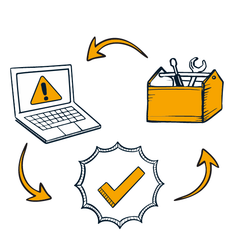
Hardware lifecycle management doesn’t start when the asset gets delivered to your clients. It starts as soon as they begin planning for a purchase. A "lifecycle approach" means you track each device from the moment your client plans to buy it until it’s eventually replaced or retired.
By managing the entire lifecycle, you always know the status of each piece of hardware. That makes maintenance and planning for upgrades more predictable. This approach keeps client systems running smoothly. Not only does that keep them happy, but it also reduces headaches for you.
Justin Kelm, CEO of JK Technology Solutions, shares his approach:
This approach to IT asset management helps your clients plan their budgets with fewer surprises. This also helps cement your role as a trusted IT partner.
2. Identify and prioritize critical assets
Not all assets are created equal. It’s essential to understand which hardware your clients rely on most. Critical assets such as servers and firewalls directly impact business performance and security. So, they need extra attention and visibility.
Prioritizing critical assets simplifies hardware lifecycle management — from scheduling maintenance to addressing cybersecurity threats.
When you identify and manage key assets with clear timelines and budgets, you can help clients feel confident about every step they take — and that’s priceless for MSPs looking to build strong relationships.
3. Automate asset management manual tasks
No one enjoys spending hours on repetitive manual tasks (well, maybe you do, but it’s probably not the best use of your time).
That's especially true when automation tools can handle tasks more efficiently. Automating hardware lifecycle management tasks like tracking asset purchase dates and warranty expirations or checking backups can free up your team for more high-leverage activities.
Automation doesn't just save you time. It reduces human error and ensures essential tasks never get overlooked. That means fewer late-night emergency calls and more positive client interactions.
Luis Alvarez, CEO of Alvarez Technology Group, shares some automation benefits his team has seen since implementing these practices:
With automation, your team spends less time chasing paperwork and performing tedious manual tasks. That leaves more time for building client relationships and driving customer success.
4. Perform regular audits with clear reporting
Audits might not be the most exciting task, but they’re essential. Regularly checking the hardware you manage helps improve visibility on upcoming technology needs. Audits also make it easier to identify problems early, so you can fix minor issues before they become major headaches.
Asset tagging helps organize client assets based on asset type, location, purchase date, warranty expiration, and importance to their infrastructure. When your asset records are clear and accessible, audits become quick and painless. You can react faster during emergencies like security incidents or hardware failures.
Luis Alvarez shares how efficient audits helped his team during a crisis:
Quick and accurate audits build trust and help your clients recover faster from unexpected problems.
5. Plan budgets — and communicate the value
Budget surprises are rarely pleasant. Effective lifecycle management lets you forecast and plan for hardware replacements or renewals — no more unwelcome surprises! Clear planning helps clients budget accurately and avoid unpleasant financial shocks.

Clients are more likely to buy into a plan they co-create. Planning budgets together shows clients you're on their side and strengthens your partnership. That’s how you earn a seat at the table.
Why integrations, consoles, and reports matter
Great IT asset lifecycle management tools have three key features: integrations, consoles, and reports.
Integrations let your tools talk to each other, saving your team from manually moving information from one tool to another. This makes automation even more powerful — no more duplication of effort!
A centralized console gives you real-time data visibility for your client’s assets — all in one place. You won't have to guess where the equipment is or ponder its current status. With easy-to-read reports, you can quickly understand essential details about asset health, costs, and future needs. This level of reporting makes it easier to plan ahead.
Together, integrations, consoles, and reports simplify your workflow. They reduce mistakes, save time, and let your team focus on solving real problems rather than chasing data. Your clients will appreciate the transparent communication!
The bottom line on IT asset lifecycle management
By adopting a lifecycle approach that prioritizes critical assets, automates manual tasks, performs regular audits, and reports clear action items, you'll boost your team’s performance and drive client satisfaction.